

Subscribe to AccessBit Newsletter
Accessibility

TL;DR
- Automated vs Manual Web Accessibility is not an either/or decision; both are essential for full compliance
- Automated accessibility testing is fast, scalable, and cost-effective but detects only ~30–40% of issues
- Manual accessibility testing uncovers deeper usability and WCAG compliance problems through human evaluation
- Relying only on automation increases legal risk and leaves critical accessibility gaps
- A hybrid approach, combining continuous automated scans with periodic manual audits, is the industry best practice
- Businesses that integrate accessibility into their development lifecycle achieve better compliance, usability, and user trust
- Accessibility efforts also contribute to improved SEO performance and broader audience reach
In 2026, web accessibility surely has become a core business requirement. Organizations across industries are facing increasing pressure to ensure that their digital platforms are inclusive, usable, and compliant with global standards.
Regulations such as the Americans with Disabilities Act (ADA), Web Content Accessibility Guidelines (WCAG), and the European Accessibility Act (EAA) are driving this shift. These frameworks are not merely recommendations; they are enforceable standards that can expose businesses to lawsuits, penalties, and reputational damage if ignored.
Despite this, a widespread misconception persists: that automated tools alone can guarantee accessibility compliance. While automation has transformed how organizations approach accessibility testing, it cannot replace the nuanced judgment of human evaluators.
This leads to a critical discussion: automated vs. manual web accessibility testing.
Understanding the differences and, more importantly, how they complement each other is essential for businesses aiming to reduce legal risks, improve user experience, and meet compliance requirements effectively.
In this guide, we explore both approaches in depth, compare their strengths and limitations, and provide a practical roadmap for building a robust accessibility strategy.
Automated vs Manual Accessibility Testing: Quick Comparison Table
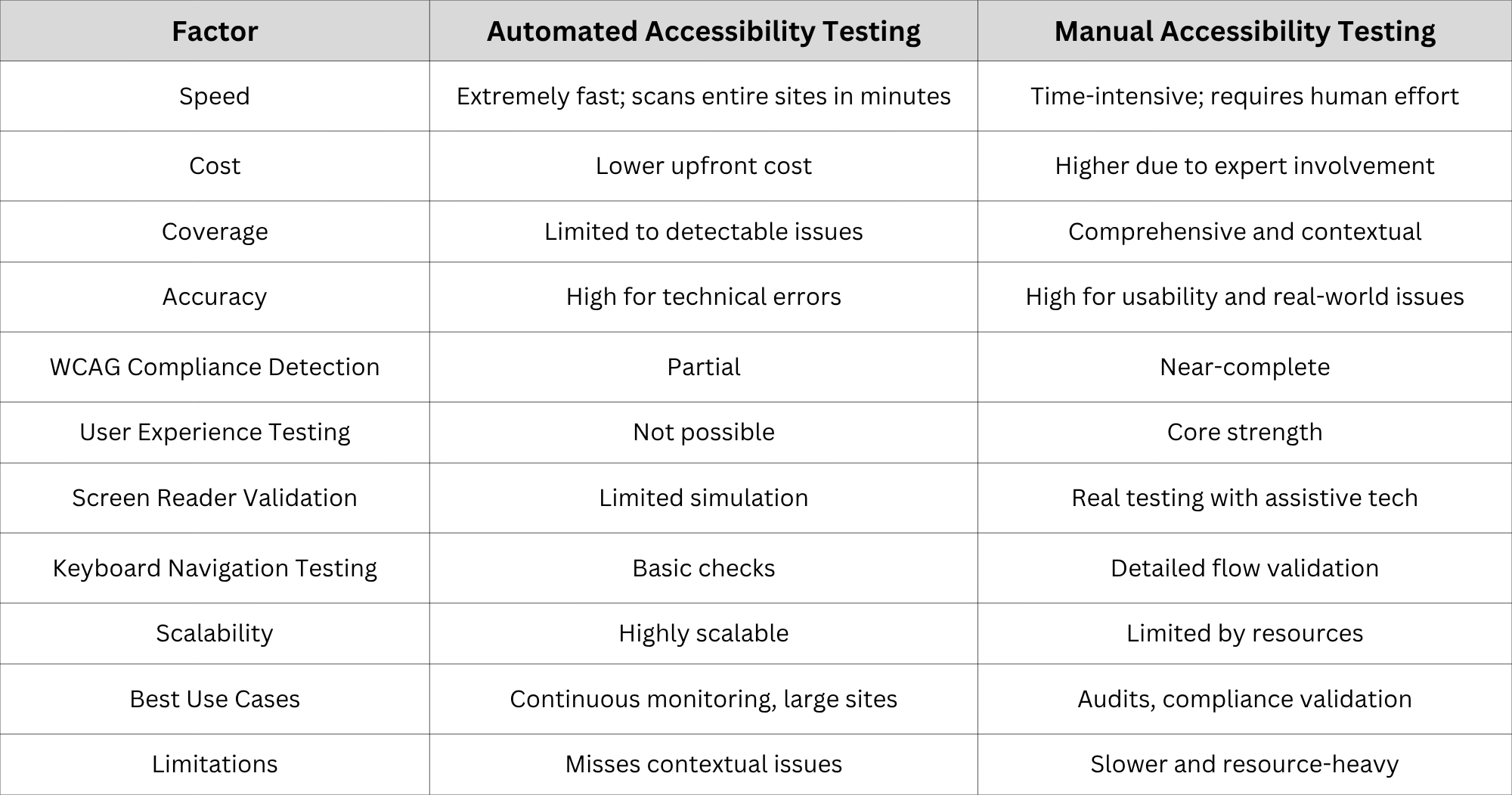
In practical environments, this comparison often translates into a layered testing strategy. Teams frequently begin with automation to establish a baseline and then refine findings through manual validation. This table, therefore, should not be interpreted as a choice framework, but rather as a guide for integration.
What Is Automated Accessibility Testing?
Automated accessibility testing refers to the use of software tools to scan websites and applications for accessibility issues. These tools analyze code structures and compare them against predefined accessibility rules, typically derived from WCAG standards.
How Automated Accessibility Testing Works
Automated tools crawl web pages and identify violations such as missing attributes, improper HTML structure, or contrast issues. They operate using rule-based engines that flag potential compliance problems. Many modern tools also integrate with development environments, enabling developers to detect issues during the coding phase itself.
Common Accessibility Issues Automation Can Detect
- Missing or empty alt attributes on images
- Insufficient color contrast ratios
- Improper heading structures
- Missing form labels
- ARIA attribute misuse
- Broken links or inaccessible elements
These checks are particularly valuable because they target recurring and easily overlooked technical errors that can accumulate over time.
Benefits of Automated Accessibility Testing
Automation provides several advantages, including:
- Rapid scanning of large websites
- Continuous monitoring capabilities
- Early detection during development
- Cost efficiency for routine checks
- Integration into CI/CD pipelines
Likewise, automation helps enforce consistency across teams, ensuring that accessibility checks are not dependent on individual awareness alone.
Limitations of Automated Accessibility Testing
However, automation has inherent limitations:
- Cannot interpret context or meaning
- Unable to evaluate user experience
- Limited in assessing assistive technology compatibility
- Often produces false positives or incomplete results
As a result, automated testing should be considered a diagnostic tool rather than a definitive authority on accessibility compliance.
What Is Manual Accessibility Testing?
Manual accessibility testing involves human experts evaluating a website using assistive technologies and real-world scenarios. It is a hands-on process that emphasizes usability, context, and user experience.
How Accessibility Experts Perform Manual Testing
Testers simulate real user interactions, often using tools such as screen readers, keyboard navigation, and magnification software. They assess whether content is understandable, navigable, and functional for users with disabilities. In many cases, testing also involves scenario-based evaluation, such as completing a purchase or submitting a form.
What Manual Accessibility Testing Evaluates
- Screen reader compatibility and output quality
- Logical reading order and content flow
- Keyboard accessibility and navigation paths
- Form usability and error handling
- Clarity of link and button labels
- Cognitive accessibility and readability
These evaluations go beyond technical correctness and focus on actual usability outcomes.
Benefits of Manual Accessibility Testing
Manual testing offers depth and insight:
- Identifies complex and contextual issues
- Validates real user experience
- Ensures WCAG compliance beyond technical checks
- Reduces legal risks significantly
It also helps organizations understand how accessibility barriers impact real users, which is critical for prioritization.
Limitations of Manual Accessibility Testing
Despite its advantages, manual testing has constraints:
- Requires skilled professionals
- Time-consuming and resource-intensive
- Less scalable for very large platforms
Nevertheless, its value lies in accuracy and completeness rather than speed.
Automated vs Manual Web Accessibility: Key Differences
1 . Detection Accuracy
Automated tools excel at identifying code-level issues, but manual testing is superior in detecting usability problems and contextual errors. For example, a tool may confirm that alt text exists, but only a human can determine whether it conveys meaningful information.
2. WCAG Compliance Coverage
Automation covers only a subset of WCAG criteria. Manual testing is necessary to achieve full compliance, particularly for guidelines that require subjective judgment.
3. Cost and Resource Requirements
Automation is cost-effective for ongoing monitoring, whereas manual testing involves higher initial investment but delivers deeper insights. Over time, the combination of both often proves more cost-efficient than relying on either alone.
4. Scalability Across Large Websites
Automation can scan thousands of pages quickly. Manual testing focuses on representative samples and critical user journeys, ensuring depth where it matters most.
5. User Experience Validation
Only manual testing can evaluate real-world accessibility experiences. This includes emotional and cognitive aspects that tools cannot quantify.
6. Legal Risk Reduction
Organizations relying solely on automation face higher legal risks due to incomplete compliance. Manual audits provide documentation and assurance that can support legal defensibility.
7. Accessibility Issue Prioritization
Manual testing helps prioritize issues based on real user impact, not just technical severity. This leads to more effective remediation strategies.
Why Automated Testing Alone Is Not Enough
Automated tools typically detect only 30–40% of accessibility issues. The remaining majority require human judgment and contextual understanding.
Examples of Issues Requiring Manual Evaluation
- Meaningful alt text descriptions
- Contextual form labels and instructions
- Screen reader experience and announcements
- Keyboard navigation flow consistency
- Cognitive accessibility challenges
These elements are inherently subjective and depend on how users interpret and interact with content.
Risks of Relying Solely on Automation
- False sense of compliance
- Missed critical accessibility barriers
- Increased exposure to lawsuits
- Poor user experience for disabled users
In many cases, businesses discover these gaps only after receiving user complaints or legal notices, which can be costly to address retrospectively.
Why Businesses Need Both Automated and Manual Accessibility Testing
The most effective approach is a hybrid accessibility testing model.
1. Continuous Automated Monitoring
Automated tools should run regularly to detect new issues as content evolves. This ensures that accessibility is maintained throughout the development lifecycle.
2. Periodic Expert Manual Audits
Manual audits should be conducted at key intervals—before launches, after major updates, and during compliance reviews. These audits provide a comprehensive assessment that automation cannot achieve alone.
3. Remediation Prioritization
Combining both approaches helps teams prioritize fixes based on severity and user impact. This prevents teams from focusing solely on low-impact technical issues.
4. Ongoing Compliance Management
Accessibility is not a one-time task. It requires continuous attention and improvement as technologies and standards evolve.
5. Best Practice Accessibility Workflow
Assess → Audit → Fix → Validate → Monitor
This cyclical process ensures sustained accessibility and long-term compliance maturity.
Automated vs Manual Accessibility Testing by Business Type
1 . Small Businesses
Small businesses often begin with automated tools due to budget constraints. However, periodic manual audits are still necessary to ensure compliance.
- Risk Level: Moderate
- Focus: Cost-effective compliance and gradual improvement
2. SaaS Companies
SaaS platforms require continuous accessibility validation due to frequent updates and feature releases.
- Risk Level: High
- Focus: Product usability and consistent experience
3. E-commerce Websites
Accessibility directly impacts conversions and customer satisfaction in e-commerce environments.
- Risk Level: Very high
- Focus: User journeys, checkout flows, and navigation
4. Healthcare Organizations
Healthcare platforms must meet strict compliance standards due to the critical nature of their services.
- Risk Level: Critical
- Focus: Patient access and legal compliance
5. Educational Institutions
Accessibility is essential for inclusive learning experiences across digital platforms.
- Risk Level: High
- Focus: Content accessibility and usability
6. Government Agencies
Government websites must adhere to strict accessibility regulations and are often subject to audits.
- Risk Level: Extremely high
- Focus: Public access and legal compliance
7. Enterprise Organizations
Large enterprises require scalable accessibility strategies supported by governance frameworks.
- Risk Level: High
- Focus: Standardization and cross-team coordination
How to Build an Effective Accessibility Testing Strategy
Creating a sustainable accessibility program requires a structured approach.
1 . Establish Accessibility Goals
Define compliance targets (e.g., WCAG 2.1 AA) and align them with broader business objectives.
2. Select Testing Tools
Choose automated tools that integrate seamlessly with development workflows and provide actionable insights.
3. Conduct Manual Audits
Engage accessibility experts to perform detailed evaluations and validate automated findings.
4. Continuous Monitoring
Implement automated scans as part of CI/CD pipelines to ensure ongoing compliance.
5. Team Involvement
Accessibility should be a shared responsibility across developers, designers, and content creators.
6. Accessibility Governance
Organizations should establish policies, documentation, and accountability mechanisms to maintain consistency and compliance over time.
Common Accessibility Testing Mistakes Businesses Make
- Relying only on automated tools
- Testing only before launch
- Ignoring keyboard accessibility
- Skipping screen reader testing
- Treating accessibility as a one-time project
- Failing to document compliance efforts
These mistakes often stem from a lack of awareness or strategic planning. Addressing them requires both education and process improvement.
The Future of Accessibility Testing
Accessibility testing is evolving rapidly as both technology and regulatory frameworks continue to advance, reshaping how organizations approach compliance and inclusivity. Artificial intelligence is playing an increasingly important role by enhancing automated accessibility testing tools, enabling more accurate issue detection and generating smarter, context-aware recommendations.
At the same time, continuous accessibility monitoring is becoming a standard practice, with real-time systems allowing organizations to proactively maintain accessibility rather than reacting to issues after deployment. In parallel, legal requirements are expanding across global markets, making compliance a critical concern for businesses operating in multiple regions.
The European Accessibility Act (EAA), in particular, is expected to have a significant impact by enforcing stricter accessibility standards for organizations serving European users. Beyond compliance, accessibility is also emerging as a core component of digital strategy, influencing customer experience, brand perception, and long-term business success, as organizations increasingly recognize the value of inclusive design in reaching broader audiences.
Conclusion
The discussion surrounding automated versus manual web accessibility is not a matter of selecting one approach over the other; rather, it is about recognizing the complementary nature of both methodologies within a unified accessibility strategy. Each plays a distinct yet equally important role in achieving meaningful and sustainable compliance.
Automated testing contributes speed, scalability, and operational efficiency, enabling organizations to monitor accessibility continuously and address recurring technical issues with minimal friction. In contrast, manual testing introduces depth, precision, and human insight, allowing businesses to evaluate usability, context, and real-world user interactions in a way that automation alone cannot achieve. When combined, these approaches form a comprehensive framework that not only strengthens compliance efforts but also enhances overall digital usability and inclusivity.
Organizations that adopt a hybrid accessibility model are inherently better equipped to navigate evolving regulatory landscapes, mitigate legal risks, and deliver inclusive digital experiences to a diverse user base. In an increasingly digital-first environment, accessibility is no longer confined to compliance obligations; it serves as a broader reflection of an organization’s commitment to equity, usability, and responsible design.
Businesses should take a proactive approach by evaluating their current accessibility practices and identifying gaps in both automated and manual testing processes. Implementing a balanced and integrated strategy will ensure that accessibility becomes an ongoing part of the development lifecycle rather than a reactive measure. The earlier accessibility is embedded into workflows, the more sustainable, efficient, and effective compliance efforts will become. For organizations seeking guidance or support, engaging with accessibility experts can provide valuable direction and accelerate progress toward comprehensive compliance.
Frequently Asked Questions
1 . What is the difference between automated and manual accessibility testing?
Automated accessibility testing uses software tools to identify technical issues in a website’s code, such as missing alt text or poor color contrast, whereas manual accessibility testing involves human evaluation of usability, navigation, and real-world user experience, particularly for individuals using assistive technologies.
2. Can automated tools ensure full WCAG compliance?
No, automated tools cannot ensure full WCAG compliance, as they are capable of detecting only a portion of accessibility issues, primarily those that can be identified through code analysis, while many compliance requirements depend on human judgment and contextual understanding.
3. How often should accessibility testing be conducted?
Accessibility testing should be conducted on an ongoing basis, with automated testing integrated continuously throughout the development lifecycle and manual audits performed periodically, especially before major releases or after significant updates.
4. Is manual accessibility testing necessary?
Yes, manual accessibility testing is necessary because it plays a critical role in identifying complex accessibility barriers and evaluating real-world user experience issues that automated tools are unable to detect effectively.


