

Subscribe to AccessBit Newsletter
Accessibility


TL;DR
- AI website builders like v0, Lovable, Cursor, and ChatGPT can create websites quickly, but they may not follow accessibility standards by default.
- AI-generated code often misses important accessibility requirements such as image descriptions, keyboard navigation, proper color contrast, and semantic HTML.
- A website that looks good visually may still create problems for people using screen readers, keyboards, or other assistive technologies.
- AI can help developers create and improve websites, but accessibility still requires proper testing and human review.
- The best approach is to check AI-generated websites, fix accessibility issues in the code, and provide user-friendly accessibility options.
- Making AI-built websites accessible requires both strong website structure and tools that allow users to adjust their experience.
Creating a website has become much faster with the help of artificial intelligence. Tools like v0, Lovable, Cursor, and ChatGPT can generate website layouts, write code, create components, and prepare complete web pages within a short time. A person who does not have deep programming knowledge can now create a working website by describing an idea in simple words.
However, speed does not always mean quality. Many AI-generated websites look attractive and work correctly for most users, but they may not follow important accessibility rules. Accessibility means making websites usable for everyone, including people with visual, hearing, mobility, and cognitive disabilities.
A website is not truly complete if some users cannot understand its content, navigate through its pages, or complete important actions. A person who uses a keyboard instead of a mouse, a screen reader instead of visual reading, or special tools to browse the internet may face difficulties when accessibility is ignored.
The growing use of AI-generated code makes this issue more important. AI tools learn from existing examples available on the internet, and many existing websites still contain accessibility problems. When AI creates new code based on these examples, it can repeat the same mistakes unless accessibility is specifically requested and tested.
This does not mean AI website builders are bad. They are useful tools that save time and help people build websites faster. However, websites created with AI should not be considered accessible automatically. They need proper checking, improvement, and testing before they are delivered to real users.
What AI Gets Wrong: Common Accessibility Problems
AI tools usually focus on creating websites that look visually correct and perform basic functions. Accessibility requires a deeper understanding of how different people interact with websites.
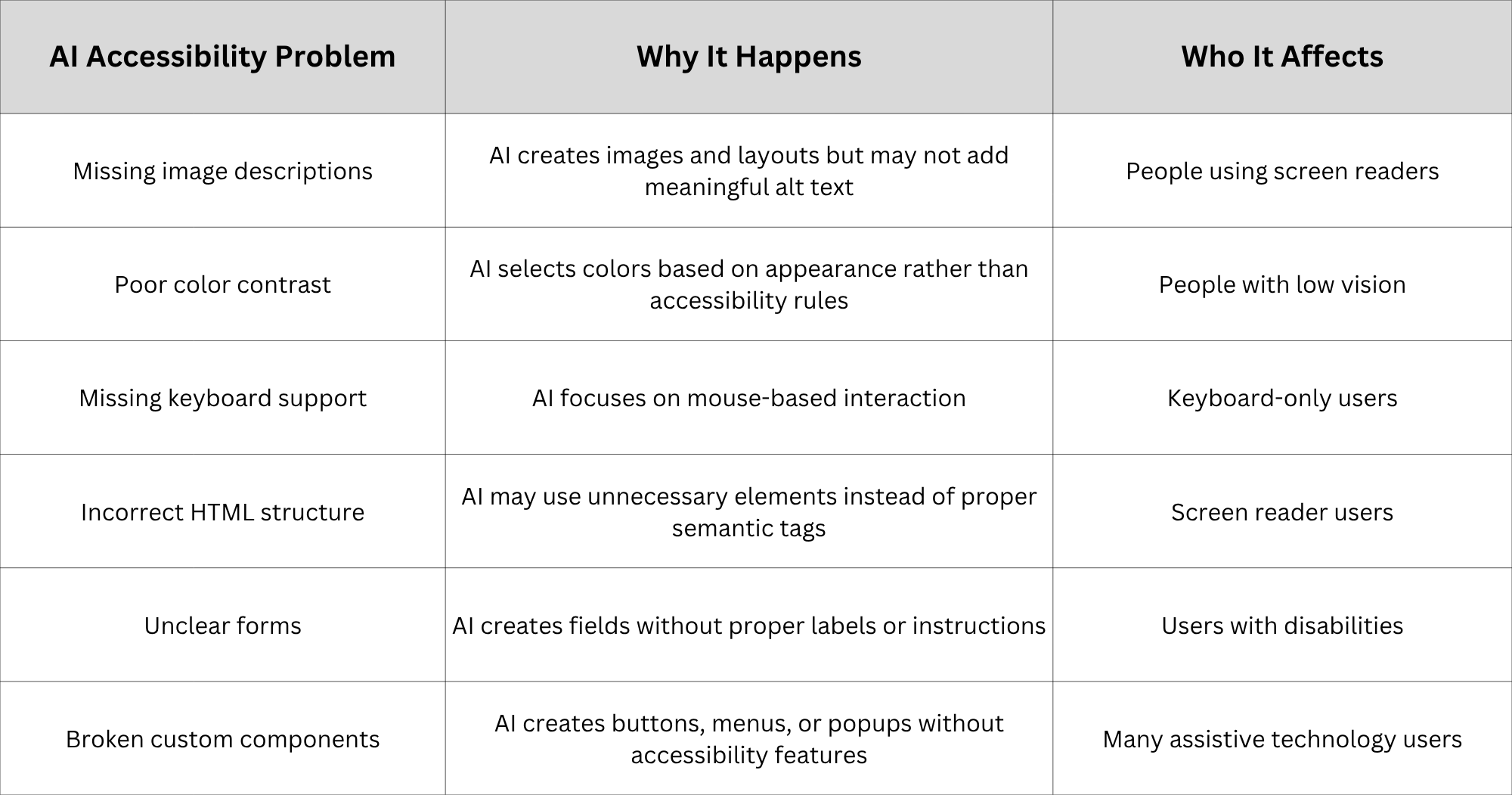
Accessibility problems are often invisible to developers because the website may work perfectly on a normal screen with a mouse. The difficulty appears when someone uses the website in a different way.
Why AI-Generated Websites Miss Accessibility: The Six Common Failures
The following are six common failures:
1. Missing or Incorrect Alternative Text for Images
Images are an important part of modern websites. They help explain products, share information, and improve the visual experience. However, people who cannot see images depend on alternative text, commonly called alt text, to understand what an image represents.
AI website builders may add images without meaningful descriptions. Sometimes they leave the alt text empty, and sometimes they create descriptions that are too general. For example, an image of a doctor explaining a medical report should not simply have alt text saying "image" or "person." A useful description should explain the purpose of the image.
Without proper alt text, screen readers cannot provide useful information to users. They may announce nothing or provide unclear information, making the website experience incomplete. AI can generate alt text, but human review is still necessary because context matters. The correct description depends on why the image is used on the page.
2. Poor Color Contrast Between Text and Background
Many AI tools are designed to create visually attractive websites. They may choose colors that look modern and stylish but do not provide enough contrast between text and background.
For example, light grey text on a white background may appear clean to some users, but people with low vision may struggle to read it. Accessibility guidelines such as WCAG provide recommended contrast levels to make content easier to read. AI does not always check these requirements unless specifically instructed.
A website should not only look good; it should also communicate information clearly to all users. Simple design decisions, such as choosing readable text colors and making important buttons visible, can make a major difference.
3. Lack of Keyboard Navigation Support
Many people navigate websites without using a mouse. Some users depend entirely on keyboards because of physical disabilities or personal preferences. A properly accessible website should allow users to move through menus, buttons, forms, and links using keyboard controls such as Tab and Enter.
AI-generated websites often focus on mouse interactions because most training examples are designed around normal browsing behavior. As a result, important elements may become difficult or impossible to access through a keyboard. A common issue is missing focus indicators. When users press the Tab key, they should clearly see which element is currently selected. Without this visual guidance, keyboard users may become confused and unable to complete tasks.
4. Poor HTML Structure and Missing Semantic Elements
A website is not only made for human visitors. Browsers, search engines, and assistive technologies also need to understand the structure of a page. This is why proper HTML structure is important.
When developers create websites manually, they usually use meaningful HTML elements such as headings, paragraphs, buttons, lists, and navigation sections. These elements help screen readers understand the relationship between different parts of a webpage. AI-generated code may sometimes create websites using too many general elements like <div> tags without proper meaning. Although the website may look correct visually, assistive technologies may not understand what each section represents.
For example, a visually designed button may actually be created as a simple text element instead of a proper button element. A screen reader user may not recognize that it is something they can interact with. This type of problem is common in AI-generated code because AI focuses mainly on creating the visual result. It does not always understand the importance of the hidden structure that helps different users navigate a website.
5. Unclear Forms and Weak Error Messages
Forms are one of the most important parts of many websites. Users fill out forms to contact a company, create accounts, make purchases, or submit information. An accessible form should clearly explain what information is required and provide helpful guidance when something goes wrong. Each input field should have a proper label, and error messages should clearly explain how users can correct mistakes.
AI-generated websites may create forms that look professional but lack important accessibility details. For example, a name field may have a placeholder text inside the box but no proper label connected to it. This can create problems for screen reader users because they may not understand what information needs to be entered.
Error messages are another common issue. A message like "Invalid input" does not provide enough information. A better message explains what happened and how the user can fix it. Small improvements in form design can make websites easier for everyone, not only people with disabilities.
6. Inaccessible Custom Features and Interactive Elements
Modern websites often include interactive features such as dropdown menus, image sliders, pop-up windows, and custom buttons. These elements improve user experience, but they also require careful accessibility planning. AI tools can create these features quickly, but they may not include all the necessary accessibility requirements.
For example, a dropdown menu should work with a keyboard, clearly announce its status, and allow users to move through options easily. A popup window should allow users to close it without difficulty and should not trap keyboard users inside it. When AI creates these components, they may work correctly for users with a mouse but fail for people using assistive technologies. Interactive features require more than appearance. They need proper behavior, clear instructions, and support for different ways of browsing.
Why AI Makes These Accessibility Mistakes
Below are some reasons why AI makes these accessibility mistakes:
1 . AI Focuses on Appearance and Function, Not Every User's Experience
AI website builders are designed to create websites that look good and work properly. Their main goal is usually to generate a useful output based on the user's request. Accessibility requires a different type of thinking. It asks questions such as:
- Can a person who cannot see the screen understand this page?
- Can someone who cannot use a mouse complete this action?
- Can a person using a screen reader understand this information?
AI does not always consider these questions automatically. When someone asks an AI tool to create a website, the tool usually tries to satisfy the visible requirements first. It creates layouts, colors, sections, and features that match the description.
Unless accessibility is clearly mentioned, the AI may not add important features such as proper labels, keyboard support, or WCAG-compliant design practices. This is why developers and website owners should not assume that AI-generated code is accessible by default.
2. AI Learns From Existing Web Code
Another reason behind accessibility problems is the information used to train AI systems. AI models learn patterns from large amounts of existing content and code. However, the internet contains many websites that were created without following accessibility standards.
When AI learns from these examples, it can repeat common mistakes. This situation is similar to learning from old notes. If the original information contains mistakes, those mistakes can continue unless someone reviews and corrects them. AI is very good at recognizing patterns and creating solutions quickly, but it does not automatically know whether every pattern is the best choice. Accessibility standards require intentional decisions, testing, and understanding of different user needs.
3. Speed Can Hide Problems
One of the biggest advantages of AI website tools is speed. A complete website can be created in hours instead of weeks. However, faster development can sometimes reduce the time spent on checking details.
A website may look complete when it is launched, but hidden accessibility issues may remain unnoticed. For example, a team may check whether the buttons work, whether pages load correctly, and whether the design looks attractive. They may not check whether the website works properly with a screen reader or keyboard navigation.
Accessibility problems often appear only when someone uses the website differently from the average user. That is why testing should be part of the development process, even when AI is involved.
How to Make an AI-Built Website Accessible
Creating an accessible website from AI-generated code requires a practical approach. AI can help identify problems and suggest improvements, but accessibility needs proper review and testing.
Step 1: Start With an Accessibility Audit
The first step is understanding what problems exist.
A basic accessibility check can identify issues related to:
- Missing alt text
- Poor color contrast
- Incorrect headings
- Keyboard navigation problems
- Missing form labels
Automated tools can help find common problems, but they should not be the only method used. Some accessibility issues require human understanding because a tool cannot always decide whether information is meaningful.
Step 2: Improve the Website Code
After finding problems, the next step is fixing the actual website structure. This includes adding meaningful image descriptions, improving HTML structure, creating proper labels, and ensuring interactive elements work correctly. The goal is not only to make the website pass a test. The goal is to make the website easier for real people to use. A website with clean, accessible code creates a better experience for all visitors.
Step 3: Give Better Instructions to AI Tools
AI tools perform better when users provide clear instructions. Instead of simply asking: "Create a website." A better request would be: "Create a WCAG 2.2 AA accessible website with proper semantic HTML, keyboard navigation, screen reader support, and accessible color contrast." Clear instructions help AI understand important requirements. However, even with good prompts, testing is still necessary.
Step 4: Add Personalization Options
Accessible code is the foundation, but different users have different needs. Some users may need higher contrast, reduced motion, larger text, or specific viewing preferences. A personalization layer can give users more control over their browsing experience. Tools like AccessBit can support this second layer by allowing users to adjust website settings according to their personal requirements. The best accessibility approach combines a properly built website with user-controlled accessibility options.
Test Your AI-Built Website Yourself: The 5-Minute Accessibility Check
Before launching an AI-generated website, a simple accessibility check can help identify many common problems. You do not always need advanced technical knowledge to find basic issues. Spending a few minutes testing the website from a different user’s point of view can reveal problems that are easy to miss during normal browsing.
A website may appear perfect when viewed with a mouse and a normal screen. However, users interact with websites in different ways. Some people use keyboards instead of a mouse, some depend on screen readers, and some need clearer text and better visibility. A quick accessibility check helps make sure the website works for a wider group of people.
The following checks can help identify common problems in AI-generated websites:
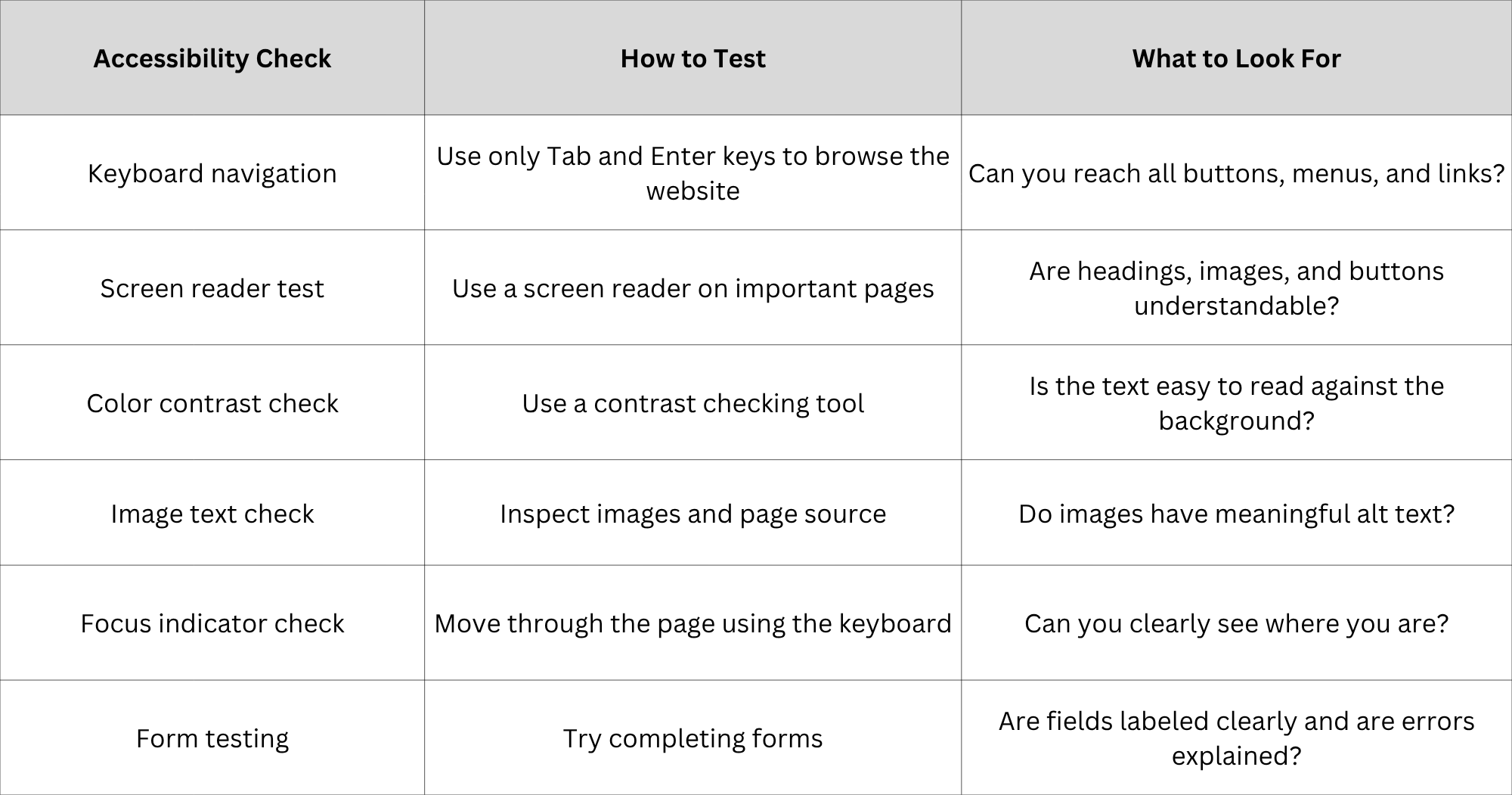
These checks do not replace a complete accessibility review, but they are a good starting point. Many accessibility problems can be discovered through simple testing before they affect real users.
The Two-Layer Fix: Accessible Code + User Control
Making an AI-built website accessible requires more than adding a single tool or plugin. Accessibility works best when two important parts are handled together: the website structure and the user's ability to customize their experience.
Layer 1: Building Accessible Website Structure
The first layer is the foundation of the website. This includes writing clean code, using proper HTML elements, adding meaningful image descriptions, creating keyboard-friendly navigation, and following accessibility standards. This layer ensures that the website is built correctly from the beginning.
For example, a properly created button should be recognized as a button by assistive technologies. A heading should clearly represent the information below it. A form should explain what users need to enter. These improvements help everyone because they create a website that is easier to understand and navigate. AI can assist with improving code, but developers and website owners must review the final result to ensure that accessibility requirements are actually met.
Layer 2: Giving Users Personal Accessibility Options
Even a well-built website may not meet every individual's preference. Different users have different needs depending on their abilities, devices, and browsing conditions. Some users may prefer stronger contrast. Others may need reduced animations, larger text, or clearer focus indicators. A personalization layer gives users more control over how they experience a website.
Solutions like AccessBit can support this approach by allowing visitors to adjust accessibility settings according to their personal needs. However, personalization tools should not be treated as a replacement for proper website development. A website should first have accessible code. Additional user controls can then improve the experience further. The strongest approach combines both methods.
Conclusion
AI has made website creation faster and easier. Businesses and individuals can now create websites quickly without writing every line of code manually. This has opened new opportunities for faster development and experimentation. However, accessibility cannot be ignored during this process. A website is created for people, and people use websites in different ways. A visually attractive website that excludes certain users is not a complete digital experience.
AI-generated code can provide a strong starting point, but it should always be reviewed for accessibility. Testing, improving code quality, and following accessibility standards are necessary steps before publishing any AI-built website. The most reliable approach is a combination of proper development and user-focused accessibility options. Accessible code creates the foundation, while personalization tools help users adjust the experience according to their needs.
AccessBit helps businesses add this personalization layer while working alongside proper accessibility practices. Companies using AI to build websites can check their current accessibility level and create a better experience for every visitor.
Frequently Asked Questions
1 . Is AI-generated code accessible?
AI-generated code is not automatically accessible. AI tools can create working websites, but they may miss important accessibility requirements such as alt text, keyboard navigation, proper HTML structure, and color contrast. Accessibility needs to be reviewed, tested, and improved after AI generates the code.
2. Do v0, Lovable, and Cursor create accessible websites?
Tools like v0, Lovable, and Cursor can create accessible websites when users provide clear accessibility requirements and properly review the output. For example, asking for WCAG 2.2 AA compliance, semantic HTML, keyboard navigation, and screen reader support can improve the generated result. However, AI output still needs testing because accessibility cannot be confirmed only by reading the generated code.
3. How can I make an AI-built website accessible?
The process usually includes five steps:
- Check the website for accessibility problems.
- Fix issues in the code, such as missing alt text, poor structure, and incorrect navigation.
- Provide better instructions to ai tools by clearly mentioning accessibility standards.
- Add user personalization options when needed.
- Test the website with real assistive technologies and different users.
Accessibility is not a single step. It is an ongoing improvement process.
4. Can AI fix its own accessibility problems?
AI can help identify and fix some accessibility issues, but it cannot fully verify its own work. For example, AI can suggest better HTML structure or generate alt text. However, it may not understand whether a description is truly useful or whether a real user can complete a task comfortably. Human testing and assistive technology checks are still necessary.
5. Will an AI-built website automatically pass WCAG standards?
No. An AI-built website should not be assumed to meet WCAG standards automatically. Passing accessibility guidelines requires proper development practices, testing, and corrections. A website may look complete and function normally while still having accessibility barriers. The safest approach is to test first and improve before launch.


