

Subscribe to AccessBit Newsletter
Accessibility


TL;DR
- ADA compliance means making websites accessible to people with disabilities.
- Accessibility includes design, navigation, forms, content, and media usability.
- ADA-compliant websites reduce legal, usability, and customer experience risks.
- Most organizations use WCAG as the practical accessibility framework.
- Start with the highest-impact accessibility fixes before advanced improvements.
Over the last decade, websites have evolved from simple informational pages into essential platforms for commerce, communication, healthcare, education, and customer engagement. As digital experiences become increasingly central to business operations, accessibility has become a critical component of modern website development.
Today, ADA compliance is no longer viewed as a niche technical requirement. It is a growing business, usability, and legal priority. Organizations are expected to ensure their websites are accessible to users with disabilities, including individuals who rely on screen readers, keyboard navigation, captions, and other assistive technologies.
At the same time, terms such as “ADA compliance,” “WCAG,” and “web accessibility” are often used interchangeably, leaving many businesses uncertain about where to begin. This blog explores the essentials of ADA compliance, the requirements that matter most, and the accessibility fixes organizations should prioritize first.
What ADA Compliance Means for Websites?
Website ADA compliance involves ensuring that websites can be used by individuals with disabilities. The Americans with Disabilities Act, which was signed into law in 1990, was initially intended to address issues of discrimination with regard to places such as office spaces, educational institutions, hotels, shopping areas, transport facilities, and public venues.
With the increasing need to access various services online, court rulings have led to the extension of accessibility considerations from physical spaces to websites. Today, websites are often considered an extension of brick-and-mortar business establishments.
From a simple standpoint, an ADA-compliant website needs to ensure that users with disabilities can:
- Navigate content effectively
- Read information clearly
- Access menus and forms
- Complete transactions
- Consume media content
- Interact with digital features independently
This includes accommodating users with:
- Visual impairments
- Hearing impairments
- Mobility limitations
- Cognitive disabilities
- Neurological conditions
For instance, users who are blind would need to use screen reading software to make sense of the content on a web page. Users with limited mobility might navigate websites through keyboard usage instead of a mouse. Users with limited hearing would require captions to access video information.
If accessibility is not implemented properly, the above users might face obstacles when accessing a website.
Thus, accessibility goes beyond being a mere technical choice; it is an aspect associated with equality and quality of use.
ADA Compliance vs WCAG vs Accessibility
One of the most common sources of confusion is the relationship between ADA compliance, WCAG, and web accessibility.
Although these terms are closely related, they do not mean exactly the same thing.
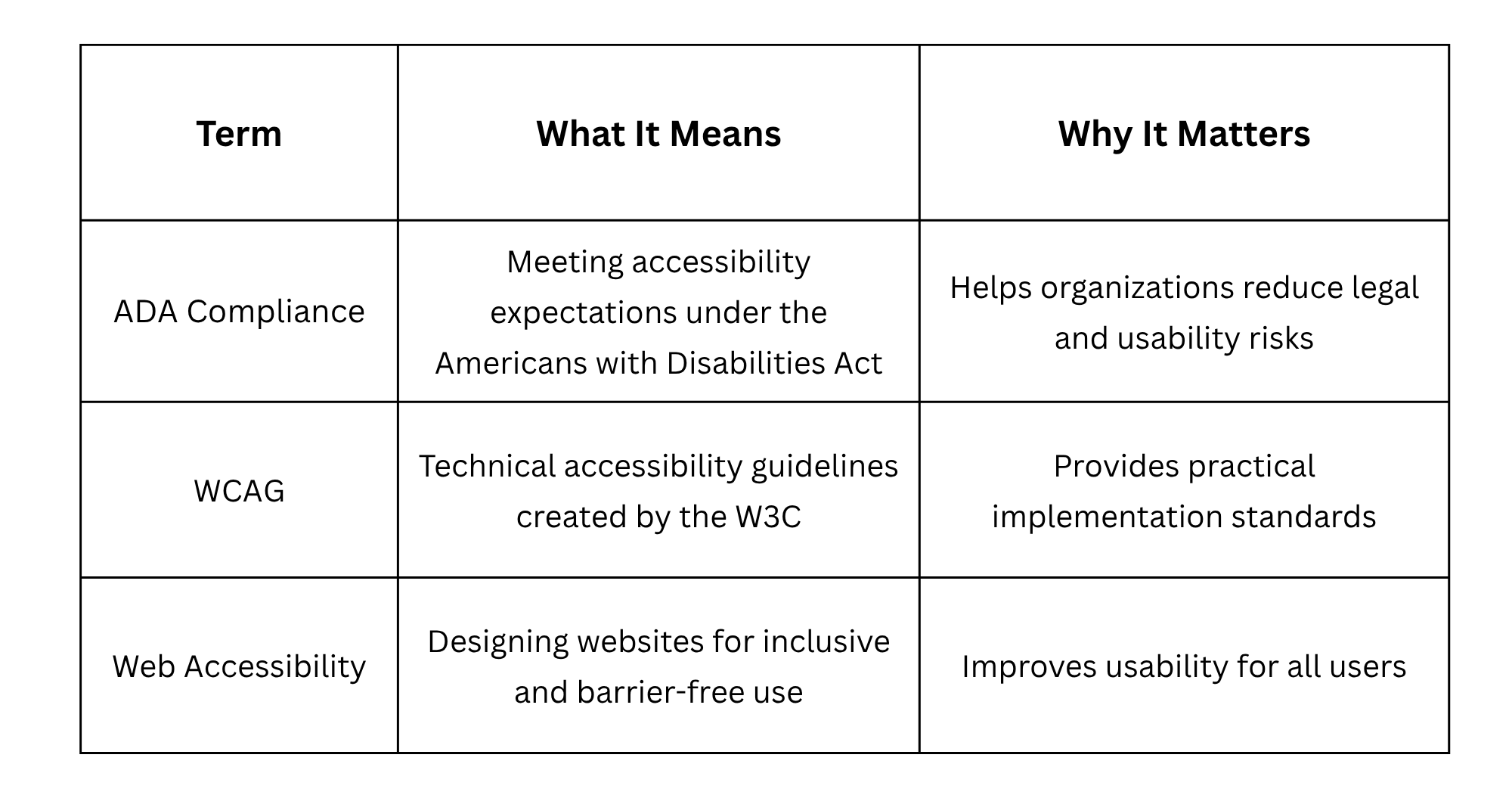
The ADA itself does not provide detailed technical instructions for website accessibility. Instead, most organizations use the Web Content Accessibility Guidelines (WCAG) as the operational framework for implementing accessibility standards.
WCAG outlines practical recommendations covering the following:
- Navigation
- Readability
- Keyboard access
- Contrast
- Multimedia accessibility
- Assistive technology compatibility
Most accessibility initiatives today focus on achieving WCAG 2.1 Level AA standards, which are widely recognized across industries as the benchmark for accessible website design.
Understanding this distinction is important because ADA compliance is primarily a legal expectation, while WCAG acts as the technical roadmap used to achieve accessibility goals.
Why ADA Compliance Matters
The number of people affected by issues of accessibility exceeds expectations.
Disabilities, even temporary disabilities or age-related changes, injuries, or environmental factors, limit access to websites and digital content.
Examples of such accessibility challenges might include:
- Small text for visually impaired users
- Poor contrast when browsing in bright environments
- Tiny targets for users who have limited motor skills
- Lack of captions for users who need to consume videos without sound
Improving website accessibility is likely to increase its usability for the general audience as well.
Moreover, there are some compelling business reasons to care about accessibility.
Website lawsuits related to ADA regulations and accessibility-related complaints rose dramatically in multiple industries, including:
- Online retail
- Healthcare services
- Education
- Financial services
- Hotels and hospitality sector
- SaaS applications
At the same time, focusing just on compliance issues may limit opportunities to reap business benefits of accessible web design.
These might include:
- Improved user experience
- Better search engine optimization results
- Increased engagement
- Higher customer trust
- Improved conversions
- Better mobile usability
Most accessibility changes coincide with UX and SEO best practices.
Examples include:
- Using appropriate headings for search engine indexing and screen readers
- Using descriptive text for links to improve navigation and context
- Optimized forms which increase usability and conversion success rates
The ADA Compliance Checklist
The following checklist outlines the most important accessibility requirements organizations should prioritize first.
Rather than treating all issues equally, this checklist emphasizes the highest-impact accessibility improvements that typically provide the greatest usability gains.
1. Add Alt Text to Images
Accessibility Impact Rating: 5/5
Alternative text, commonly called alt text, allows screen readers to describe images to users who cannot see visual content.
One of the most common uses of alt text is helping visually impaired users understand:
- Product images
- Charts
- Diagrams
- Buttons
- Informational visuals
Good alt text should:
- Be descriptive
- Explain context
- Describe image purpose
- Avoid unnecessary wording
Decorative images that provide no informational value should typically use empty alt attributes so screen readers can skip them appropriately.
Adding descriptive alt text is often one of the fastest and most impactful accessibility improvements organizations can implement.
2. Use Proper Heading Structure
Accessibility Impact Rating: 5/5
Headings create the structural framework of a webpage.
Screen reader users frequently navigate pages by jumping between headings, making logical structure essential for usability.
Best practices include:
- Using one H1 per page
- Organizing H2s and H3s logically
- Avoiding skipped heading levels
- Maintaining consistent hierarchy
This is particularly important for:
- Blog articles
- Documentation portals
- Service pages
- Educational resources
- Long-form content
Proper heading structure also improves readability and SEO organization.
3. Make the Site Keyboard Accessible
Accessibility Impact Rating: 5/5
Many users cannot operate a mouse and rely entirely on keyboard navigation.
ADA-compliant websites should support:
- Logical tab order
- Keyboard menu access
- Focus indicators
- Form accessibility
- Skip navigation links
Keyboard accessibility is considered one of the most critical accessibility requirements because navigation barriers can completely block access to website functionality.
One of the most common accessibility failures is interactive elements that cannot be reached or activated using a keyboard alone.
4. Check Color Contrast
Accessibility Impact Rating: 5/5
Poor contrast remains one of the most widespread accessibility problems on modern websites.
Low-contrast text may become difficult or impossible to read for users with:
- Low vision
- Color blindness
- Visual impairments
Examples of problematic design choices include:
- Light gray text on white backgrounds
- Weak button contrast
- Thin typography with poor visibility
Readable contrast improves:
- Accessibility
- Mobile readability
- User comfort
- General content clarity
Many organizations now integrate automated contrast testing directly into design workflows.
5. Label Forms Clearly
Accessibility Impact Rating: 5/5
Forms are essential interaction points for websites.
Users may encounter accessibility barriers when forms:
- Lack visible labels
- Display unclear errors
- Use placeholder-only instructions
- Fail to explain required fields
Accessible forms should include:
- Persistent labels
- Clear instructions
- Helpful validation messages
- Required field indicators
This improves both accessibility and form completion rates.
6. Ensure Links and Buttons Are Descriptive
Accessibility Impact Rating: 5/5
Links and buttons should clearly communicate their purpose.
Avoid vague phrases such as:
- “Click here”
- “Read more”
- “Learn more”
Instead, use meaningful descriptions like:
- “Download ADA compliance checklist”
- “View accessibility audit services”
- “Read accessibility guidelines”
Descriptive interface labels improve:
- Screen reader usability
- Navigation clarity
- SEO context
- User understanding
7. Make Media Accessible
Accessibility Impact Rating: 4.5/5
Accessible media ensures users with hearing or visual impairments can consume audio and video content effectively.
Important accessibility features include:
- Closed captions
- Transcripts
- Audio descriptions
- Accessible media controls
This is especially important for:
- Webinars
- Product demonstrations
- Tutorials
- Educational videos
Accessible media also improves usability in silent or noisy environments.
8. Test Mobile Usability
Accessibility Impact Rating: 5/5
Modern accessibility extends across devices and screen sizes.
Websites should support:
- Responsive layouts
- Zoom functionality
- Readable mobile text
- Accessible touch targets
- Orientation flexibility
Many accessibility issues now originate from mobile-first design patterns that unintentionally reduce usability.
9. Check PDFs and Downloads
Accessibility Impact Rating: 4.5/5
PDFs are frequently overlooked during accessibility reviews.
ADA compliant documents should include:
- Tagged structure
- Logical reading order
- Searchable text
- Proper headings
- Alt text for embedded visuals
Whenever possible, organizations should provide accessible HTML alternatives for critical documents.
ADA Compliance Prioritization: What to Fix First
One of the biggest challenges organizations face is deciding where to begin.
Accessibility can feel overwhelming when treated as one massive project. A better approach is prioritizing fixes based on user impact and implementation urgency.
Priority 1: Fix Immediately
These issues create major accessibility barriers and should be addressed first.
High-Impact Accessibility Fixes
- Alt text
- Keyboard navigation
- Heading structure
- Form labels
These improvements often provide immediate usability gains.
Priority 2: Fix Next
These improvements strengthen accessibility and overall user experience quality.
Important Accessibility Enhancements
- Color contrast
- Link descriptions
- Media captions
- Mobile usability
Many of these improvements also improve SEO and conversion optimization
Priority 3: Ongoing Accessibility QA
Accessibility should become part of ongoing operational processes.
Continuous Accessibility Maintenance
- PDF reviews
- New page testing
- Plugin evaluations
- Accessibility regression testing
- Content publishing reviews
Accessibility is most effective when integrated into long-term workflows rather than treated as a one-time remediation effort.
Common ADA Compliance Mistakes
Many organizations unintentionally create accessibility problems despite good intentions.
Common mistakes include:
- Relying entirely on accessibility overlays
- Ignoring keyboard testing
- Using poor heading structures
- Uploading inaccessible PDFs
- Failing to retest after redesigns
- Using vague buttons and links
- Adding autoplay media without controls
One of the most misunderstood aspects of accessibility is assuming automated tools alone can guarantee compliance.
Automated scanners are helpful, but manual usability testing remains essential for identifying real-world accessibility barriers.
How to Audit a Website for ADA Compliance
A practical accessibility audit generally involves three stages.
Step 1: Automated Accessibility Testing
Use accessibility tools to identify:
- Missing alt text
- Contrast failures
- Heading problems
- Missing labels
Automated tools provide a useful starting point.
Step 2: Manual Accessibility Reviews
Manual testing should evaluate:
- Keyboard navigation
- Screen reader usability
- Focus visibility
- Responsive behavior
- Form accessibility
This stage is critical because many accessibility barriers are contextual.
Step 3: Ongoing Accessibility Monitoring
Accessibility should be reviewed continuously as websites evolve.
This includes:
- Testing updates
- Auditing new content
- Evaluating plugins
- Reviewing templates
- Monitoring regressions
Organizations increasingly integrate accessibility into development and QA workflows.
Conclusion
ADA compliance is no longer viewed solely as a legal requirement. It has become an important part of usability, customer experience, and responsible digital design.
The most effective accessibility strategies focus on prioritization rather than attempting to solve every issue simultaneously. High-impact improvements such as keyboard accessibility, alt text, form labeling, and heading structure often deliver immediate usability benefits while reducing accessibility risks.
As websites continue evolving, accessibility should become part of ongoing development, design, and content workflows rather than a one-time remediation project.
Organizations that invest in accessibility today are better positioned to create inclusive, usable, and future-ready digital experiences for all users.
Frequently Asked Questions
1 . What is an ADA compliance checklist for websites?
An ADA compliance checklist is a structured list of accessibility requirements used to evaluate whether a website is usable for people with disabilities. It typically includes accessibility checks related to navigation, forms, headings, media, keyboard access, color contrast, and screen reader compatibility.
2. Is ADA compliance the same as WCAG?
Not really. ADA compliance is about complying with the accessibility expectations set by the Americans with Disabilities Act, whereas WCAG outlines the technical standards that organizations typically implement to meet website accessibility expectations.
3. What are the most important ADA compliance requirements?
Please do understand that the key ADA compliance elements may vary from one organization to another; however, some common priorities may include keyboard accessibility, alt text, heading structures, form accessibility, readability, and descriptive navigation labels.
4. Do all websites need to be ADA compliant?
Expectations will depend on the kind of business involved, the industry, and other factors. Nevertheless, with increasing pressure for more inclusive digital experiences, organizations delivering online services are likely to be asked to prove their commitment to accessibility.
5. How do I start with ADA compliance?
Start by conducting an audit aimed at identifying priority barriers that may hinder the usability of your website. Begin with the most impactful items such as alt text, keyboard navigation, headings, and forms.


