

Subscribe to AccessBit Newsletter
Accessibility


TL;DR
- Accessibility overlays are third-party tools added to websites to improve accessibility by changing how a site looks and behaves.
- They provide features like text resizing, contrast adjustment, reading help, and navigation support.
- They do not fix underlying website code issues such as poor structure or missing accessibility labels.
- They do not guarantee WCAG compliance or legal accessibility standards on their own.
- They work best as a small enhancement layer, not a full accessibility solution.
Overlays vs Native Fixes vs Manual Audits (At-a-Glance Comparison)
Accessibility is not solved by a single tool. It depends on how a website is built, tested, and maintained.
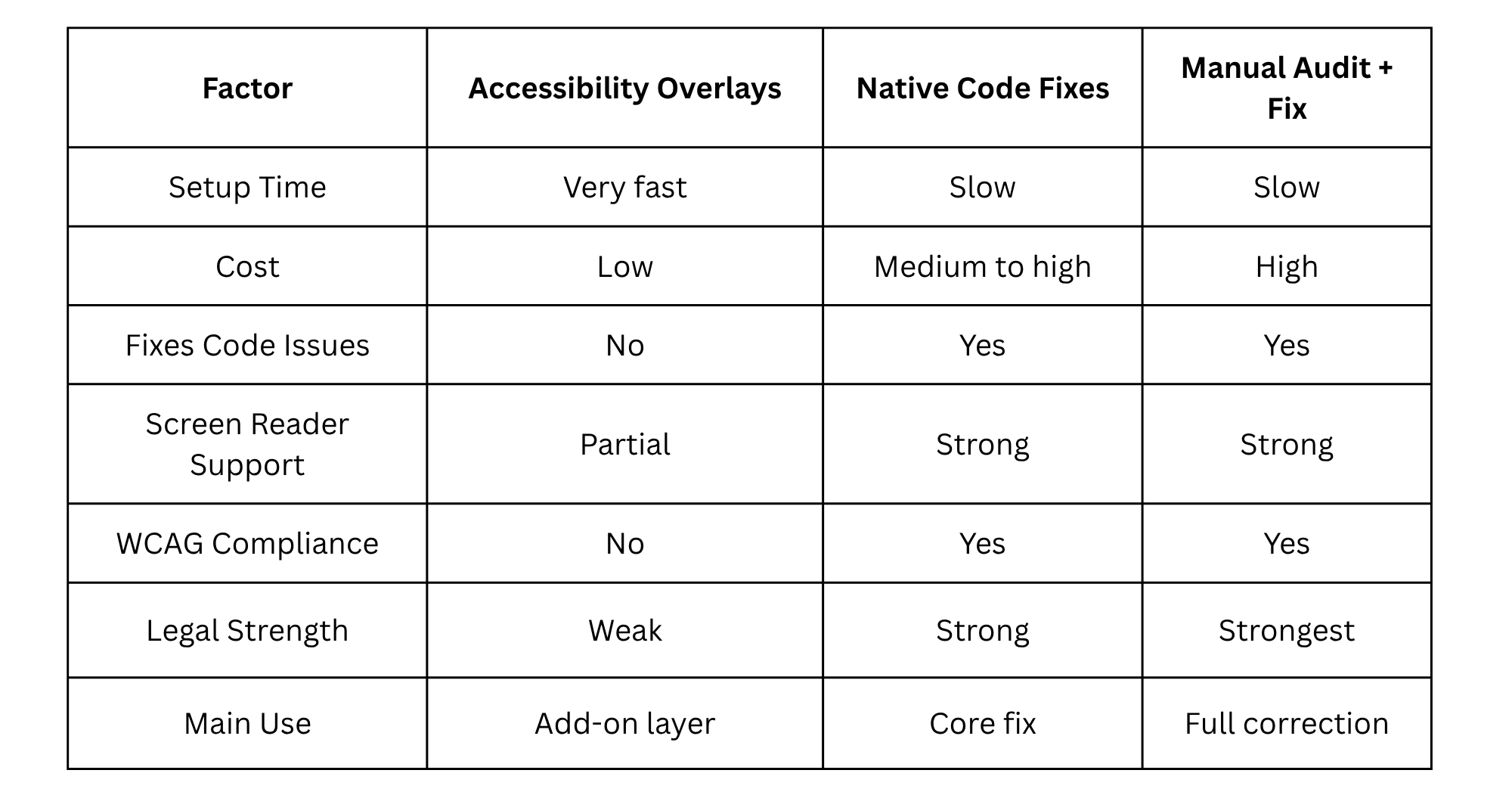
The main point is simple. Overlays sit on top of a website. They do not replace real fixes.
Why Are Accessibility Overlays Important in 2026?
Accessibility has become an essential aspect of any modern website. Nowadays, all websites are supposed to be accessible by all people, including individuals using screen readers, keyboards, or voice commands.
That is why accessibility overlays became popular. They were presented as a tool to achieve significant results without making substantial modifications to the website itself.
For this reason, accessibility overlays could help non-specialized teams improve their website accessibility quickly.
However, the view on overlays changed in 2026. Today, overlays are considered an add-on to existing systems rather than a comprehensive solution. That means that accessibility overlays can enhance certain user experiences.
It will be discussed in detail further along with a detailed explanation of what the concept of an accessibility overlay implies and where it helps.
What is an Accessibility Overlay?
A small script added to a website, normally after installation, creates a floating button or menu that denotes outfits with which the users want it to be dressed.
It may include changing text size, colors, increasing contrast, providing links, or providing reading support tools.
Overlays do not interfere with the actual website code. They only apply changes on top of the existing page using JavaScript or CSS behavior.
The real structure of the website remains the same, so if headings are incorrect, forms are broken, or screen reader support is missing, the overlay does not fix that.
At best, overlays give users additional degrees of control over appearance. At worst, they create the illusion that contextually serious accessibility problems have already been solved.
Common Accessibility Overlay Features
Most accessibility overlays offer similar features, even if they have different branding.
1 . Text resizing controls – Let users increase or decrease font size for better readability
2. Contrast settings – Enable high-contrast or adjusted color modes for low-vision users
3. Spacing adjustments – Modify line height and letter spacing to improve readability
4. Link highlighting/focus indicators – Help keyboard users navigate more clearly
5. Reading guides/screen masks – Assist users in following text line by line
These features can improve usability in certain cases, but they only affect the surface of the website. They do not fix deeper structural problems in the code.
Pros, Cons & Debate Around Accessibility Overlays
There are a lot of arguments about overlays among web developers, because there's no clear answer on whether or not these tools can really be useful.
On the one hand, one obvious strength is quick deployment. These plugins can be easily used without spending much time on development.
Another point is that overlays provide control options for users that can indicate whether a website cares about its customers or not. This might be especially helpful at the initial stage of development.
Nonetheless, there are many significant limitations of these tools as well. For example, overlays can't make any improvements in website design. Moreover, in certain cases, they can negatively affect the usability of a website by interfering with screen readers and other tools.
Over-reliance is another issue that needs to be addressed. It happens when some organizations take overlays to be their only solution and therefore postpone doing other work for accessibility.
It’s important to understand that there is no way to make sure that overlays comply with legal requirements for website accessibility, such as WCAG.
According to many experts referred to on the Overlay Fact Sheet (overlayfactsheet.com), overlays are unable to ensure accessibility and can even bring about certain problems.
On the other hand, some specialists think that there is still a place for overlays if they are seen as an auxiliary tool.
Simply put, overlays are neither good nor bad.
When an Accessibility Overlay Makes Sense
An accessibility overlay is best if the site already has a decent amount of accessibility built-in.
In such cases, the overlay becomes another component that aids users in customizing their experiences. It doesn't have to fix issues with structure since structure is fine.
Overlays could prove valuable to businesses that wish to provide some basic accessibility features while considering more comprehensive solutions in the future.
But an accessibility overlay is definitely not what a poorly accessible website needs. One should never use it as a quick-fix solution to comply with accessibility requirements.
To put it simply, an overlay is only needed if it aids accessibility in some way, not if it replaces it.
How to Evaluate an Accessibility Overlay (7-Point Checklist)
Before choosing an accessibility overlay, it’s important to look past marketing claims and focus on real usability and performance:
1. It should support smooth keyboard navigation, allowing users to move through the site without barriers
2. It should work properly with screen readers, without breaking how content is read or structured
3. It should not hide underlying code issues like missing labels, poor heading structure, or bad semantic markup
4. It should give users control without forcing layout changes that disrupt the original design
5. It should maintain good site performance, without slowing down load time or interaction
6. It should clearly state its limitations, without overclaiming full accessibility or compliance
7. It should support and complement real accessibility fixes, not replace them
If a tool fails most of these checks, it should not be treated as a complete accessibility solution.
Conclusion
The use of web overlays in the current times is a common practice in web development, but such overlays do not provide a complete solution to the problem of accessibility. Rather, such overlays can assist users in changing how they access a particular website. In some cases, websites using overlays are likely to lack accessibility problems, whereas those using proper coding techniques yield positive outcomes.
AccessBit is an easy-to-use accessibility solution that aims to make changes to a website without altering its structure. Its functions include the use of controls such as readability options and visual settings.
It suits well in assisting websites that have some levels of accessibility incorporated in their systems. In no way can AccessBit be seen as a replacement of the proper design and implementation of web accessibility solutions.
When used appropriately as part of the total web accessibility approach, it may be useful for businesses seeking an easy start toward improving their web accessibility.
Frequently Asked Questions
1. Will an accessibility overlay ensure that your website will be ADA compliant?
Accessibility overlays might aid in improving usability but do not necessarily guarantee compliance with either the American Disabilities Act (ADA) or the Web Content Accessibility Guidelines (WCAG) because they generally do not correct any coding issues.
2. Are accessibility overlays good or bad?
Accessibility overlays are not inherently bad; however, they are limited tools that may be useful in certain situations but should never be used to replace proper accessible development or audits.
3. Why do screen reader users dislike overlays?
Screen reader users may sometimes find that overlays alter the expected behavior of website content as perceived by the screen reader application. This alteration may result from the addition of new objects or change in the behavior of pre-existing objects within the database (website).
4. What types of accessibility overlays exist?
Examples of popular types of accessibility overlays would include many tools including AccessBit. All of these tools contain end-user facing device interface controls that are able to perform actions such as changing contrast values and zooming in and out of the displayed document content.
5. Are accessibility overlays worth it?
For individuals with disabilities, the accessibility overlay tools can be an improvement when appended to an established accessible website; however, standalone the accessibility tools cannot be relied upon to create a fully accessible or compliant website.


