

Subscribe to AccessBit Newsletter
Accessibility


TL;DR
- AI accessibility has revolutionized the field of inclusive design by making it fast, easy to scale, and simple to build into digital products.
- AI technologies can now produce image alt tags, captions and transcripts, detect accessibility barriers, streamline difficult information, and create personalized digital interfaces based on the unique requirements of individual users.
- The major revolution in AI accessibility is that of moving from universal accessibility to adaptable interfaces which allow users to customize their digital environment according to their requirements.
- But AI should be considered as an addition and not a substitute for good development practices, human testing, and disability-driven feedback.
Accessibility + AI: How AI Is Changing Inclusive Design in 2026
Digital accessibility has followed a well-known cycle over the past few decades. After developers create websites, apps, and other digital products, accessibility specialists test them for potential problems. The issues are found, resolved, and retested. Although this approach has raised the bar for digital accessibility standards, there is a drawback: the procedure can be time-consuming, resource-intensive, and labor-intensive.
That process has begun to change due to artificial intelligence.
By 2026, AI accessibility will extend beyond obstacle detection. AI will develop into a design partner that will assist teams in creating more inclusive solutions and promptly identifying accessibility problems.
This represents a major change in terms of how companies are approaching inclusive design. Rather than designing accessible digital experiences at the last minute through a checklist-like process, artificial intelligence is making it possible to incorporate accessibility into everyday workflow processes. Designers will be able to get recommendations when designing user interfaces. Developers will be able to catch potential accessibility concerns before releasing products. Content creators will be able to create alternate formats faster. Users will have access to digital experiences that cater to their needs rather than having to interact with the same user interface as everyone else.
The potential of this technology is huge, considering the impact of accessibility on an enormous global population. Over one billion people in the world suffer from disabilities, which include visual, auditory, cognitive, neurological, and physical disabilities. In addition to complying with laws and regulations, it also represents a huge business opportunity.
But there needs to be a little balance in this dialogue about AI and accessibility.
After all, AI is very strong technology, but it is not magic.
An automatic system that creates alternative text will likely capture the description of the images in the image, but it will certainly miss out on context, emotions, and relevance of those images. While an AI-driven accessibility testing system will find numerous technical errors, it won’t be able to know whether a disabled person would succeed in completing a task. The same is true for AI-driven interfaces: they will create personalized experiences, but the designer’s choice matters as well.
The key point here is that AI speeds up the process of accessibility, but it does not replace it.
Future is not about automating designers, developers, accessibility experts, and users using AI. It is about creating tools for those people to create flexible, inclusive, and responsive experiences.
In this article, we will talk about the future of inclusive design in 2026, its current usage, mechanisms behind AI accessibility tools, where their limitations exist, and finally why the marriage between AI and human-centered design means the next big step in digital accessibility.
Accessibility + AI: What's Actually Changing?
What is unique about the impact that AI has on accessibility is not a single component or technology. Rather, what is distinctive is the shift in terms of speed, scalability, and customization.
Typically, an accessibility assessment would include tasks like testing keyboard navigation, assessing color contrast, checking screen reader compatibility, evaluating the structure of content, and providing recommendations. All these steps are crucial, but they can be time-consuming and hard to implement regularly for big websites and digital products.
AI shifts the equation of accessibility by making it possible for companies to conduct analysis, provide recommendations, and adjust at a greater scale.
If we consider a multinational corporation, it will have hundreds of thousands of web pages and images and changing content all the time. Manual testing of each change is impossible. AI technologies can help monitor such environments regularly and detect any potential accessibility problems instantly.
This leads to a more proactive strategy. Instead of solving issues as and when they arise, teams can keep improving accessibility constantly.
There’s another change brought about by the emergence of AI – Personalization.
For decades, accessibility was all about standardization. Designers adhered to certain guidelines, like Web Content Accessibility Guidelines (WCAG), to ensure their products catered to various accessibility needs. While these guidelines are important, they can’t fully address the variability among humans.
Two people with the same disability may have preferences that differ when it comes to the use of digital interfaces.
While one may require low-motion and high-contrast displays, the other may require large font sizes and simplified designs. A person with ADHD would appreciate distraction-free experience and clear content.
Adaptive accessibility experiences can now be achieved thanks to AI technologies, with users being able to set up their preferences and digital environments adapting to those.
This is one of the most prominent aspects of the inclusion of AI in design: accessibility has started moving away from the concept of trying to create one universal interface suitable for everybody toward more flexible experiences that cater to people’s needs.
The role of AI in accessibility could be looked at from two different angles.
First of all, AI works as an assistant in the process of creation and testing. With the help of AI technologies, it becomes much easier to produce accessible content as quickly as possible by using AI-powered tools like alt text generation, automated accessibility testing, captioning, and code suggestions.
Secondly, AI works as a customization layer that allows digital experiences to adapt on the spot by changing presentation, interaction, and content depending on user preferences.
How AI Is Used in Inclusive Design Today
AI is already being applied across many areas of digital accessibility. Some applications focus on helping teams create better products, while others focus on adapting experiences for users.
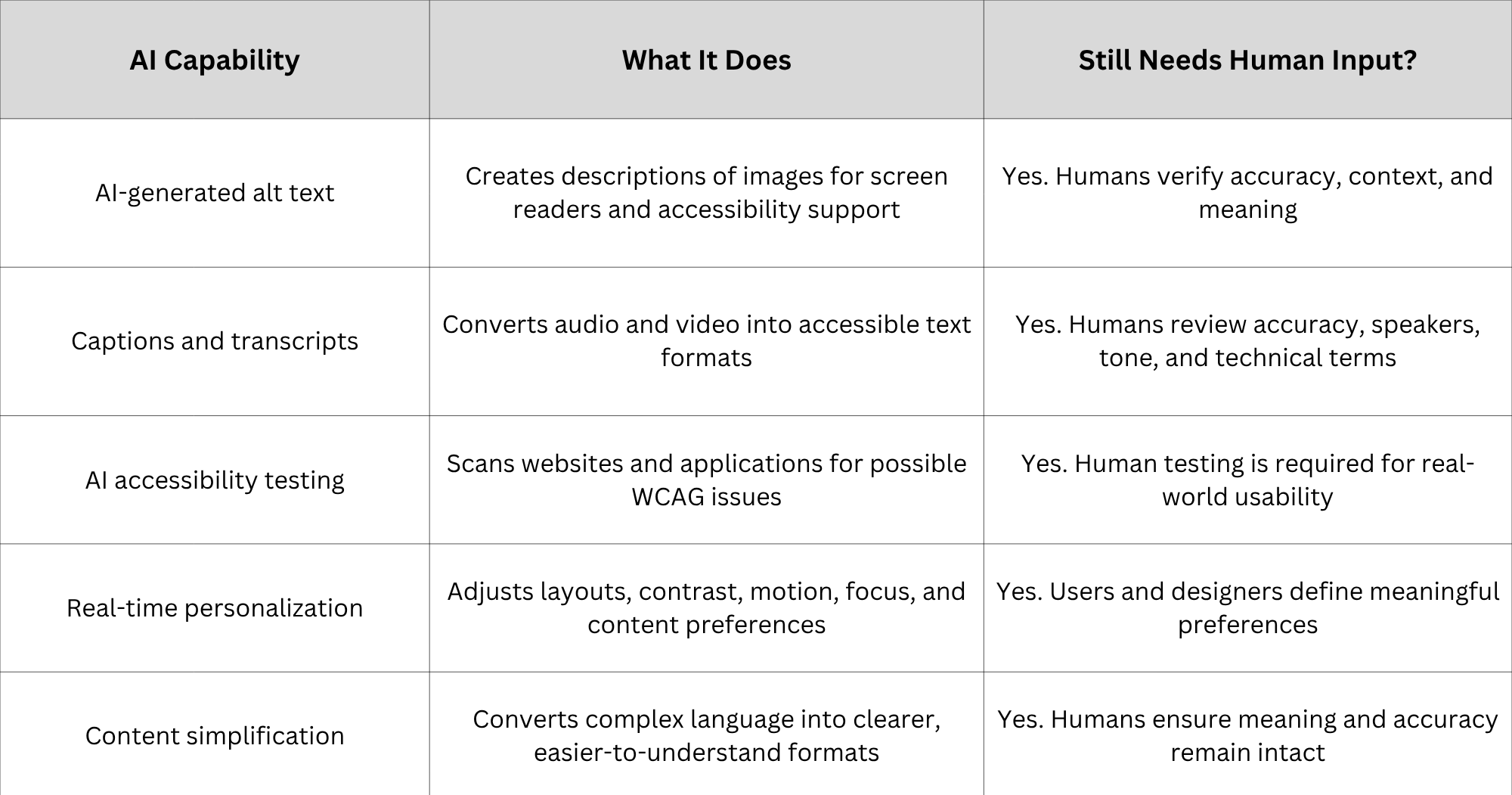
This table makes one thing clear: AI is most effective when used as an accessibility accomplice. The most successful ones don’t think, “How can AI replace accessibility?”
Instead, the successful ones think, “How can we use AI to make accessibility happen for more people?”
The Ways AI Is Changing Inclusive Design
The effect of artificial intelligence on accessibility is becoming the most apparent in the practical spheres where designers, developers, and users encounter the digital barriers each day. Starting from image description and going up to interface adaptation in real-time, AI becomes an invaluable tool for solving accessibility problems that have been hard to solve before.
Nevertheless, the most efficient solutions provided by AI for accessibility do not rely only on automation. They combine machine intelligence with human knowledge. Artificial intelligence can quickly analyze huge amounts of data, find patterns, and offer suggestions. Nevertheless, accessibility is primarily about people, their needs, preferences, environments, and experiences.
The following spheres represent the places where AI becomes a factor in inclusive design and keeps extending its reach.
1 . AI-Generated Alt Text and Image Descriptions
Automatic image description is one of the most popular areas where AI accessibility technologies can be used.
Imagery plays a key role in digital communications. Images are widely used in order to convey information through websites, applications, social media, online stores, and educational materials. But for those users who use screen readers or who have some kind of visual impairments, the absence of proper alt texts can become a huge barrier.
In the past, the creation of alt texts entailed going through all images and manually describing them. Of course, for small websites, it is possible to do this work. However, for companies or organizations which have thousands and even millions of images, it could become a huge issue.
But with the development of AI vision models, everything has changed. Modern AI technologies can easily scan any image and write descriptions in a couple of seconds. It is possible to detect objects, environments, texts and other details from the images.
For instance, an online store having hundreds of thousands of images can employ AI technology to auto-generate the initial content rather than manually create the text for all images. News media outlets can handle visual content in a much quicker way. Learning portals can enable students to get easier access to the content that is highly visual in nature.
On the other hand, AI-created alt text shows why human intervention is necessary.
The system can correctly recognize all items that are depicted in an image, but fail to understand the reason why that particular image is needed.
Take a photo of a person standing by a building. In most cases, the AI will provide a description like "a person standing by a building". However, the description may be correct in terms of what is depicted in the image, but not the meaning.
Alt text is not just about describing images.
Because of this, cooperation rather than replacement is probably what AI alt text will look like in the future. AI can produce a quick first draft, but humans must confirm that the description conveys the intended meaning.
2. Live Captions and AI-Powered Transcripts
The other important breakthrough in terms of accessibility of AI is real-time speech recognition technology.
In order to access videos, webcasts, educational materials and live broadcasts, people who are deaf or have hearing impairments need to rely on captions.
Before the emergence of AI, the generation of correct and high-quality captions entailed the involvement of specialized transcription services, which could prove costly and complicated.
Nowadays, artificial intelligence allows generating captions and transcribing speech in real time for meetings, videos, lectures, and broadcasts. In addition to being accessible, this technology is also convenient for many users who don't consider themselves disabled.
The demand for captions is just one example of the key principles underlying accessibility – features intended to make something accessible to people with disabilities usually prove valuable to others as well.
There are many situations when people use captions for videos to watch them without sounds – when traveling in a car or using public transportation, working in noisy places, learning foreign languages, etc.
Nevertheless, accuracy is an issue.
Transcription software has trouble handling accents, background noise, multiple speakers, specialized language used in particular industries, and emotional tones. If a person gives a lecture on medicine, law, or engineering, the terminology he or she uses may be inaccurately understood by the software.
Therefore, professional content continues to require human intervention.
AI helps to transcribe captions quickly and inexpensively, but it does not guarantee their accuracy, which may have severe consequences when misunderstood.
3. AI Accessibility Testing and Automated Audits
Accessibility testing is another area where AI is creating significant efficiency improvements.
Traditionally, accessibility audits required specialists to manually inspect websites and applications against standards such as WCAG. This process includes reviewing keyboard navigation, screen reader compatibility, form labels, colour contrast, semantic structure, and interactive elements.
Human accessibility testing remains critical, but AI-powered tools can dramatically speed up the early stages of evaluation.
AI accessibility testing systems can scan websites, identify common issues, and highlight potential problems within seconds. They can detect missing image descriptions, insufficient colour contrast, incorrect heading structures, inaccessible forms, and other technical barriers.
For development teams, this creates an opportunity to identify problems earlier in the product lifecycle.
Instead of discovering accessibility issues after launch, teams can receive continuous feedback while building features. This supports the principle of "accessibility by design" rather than treating accessibility as a final quality check.
However, automated testing has clear limitations.
A tool may identify that a button has proper HTML markup, but it cannot always determine whether the button's purpose is understandable. It may detect that content exists but cannot evaluate whether a person with a cognitive disability can easily understand the experience.
Automated testing catches patterns. Humans evaluate experiences.
The strongest accessibility programs combine AI-powered testing with manual reviews and testing by people with disabilities. Technology can identify many technical barriers, but only real users can confirm whether a product genuinely works for them.
4. Real-Time Accessibility Personalization
Perhaps the most transformative opportunity for AI accessibility is personalization.
For decades, digital accessibility has focused on creating a single experience that meets established standards. Those standards are necessary, but human needs are diverse.
AI introduces the possibility of creating interfaces that adapt to individual users.
Instead of expecting every person to navigate the same design, AI-powered systems can adjust digital experiences based on user preferences. A person could choose accessibility settings once, and future experiences could adapt automatically.
This represents a major shift from static accessibility toward dynamic accessibility.
For example, a personalization system could allow users to create profiles based on their needs:
- A Vision profile could increase contrast, adjust text size, improve focus indicators, and modify visual elements.
- A Screen Reader profile could optimize page structure, navigation order, and descriptive content.
- A Cognitive profile could simplify layouts, reduce distractions, and present information more clearly.
- An ADHD-friendly profile could minimize unnecessary movement, reduce visual clutter, and improve focus.
- A Motor accessibility profile could increase interactive target sizes and simplify controls.
- A Seizure-safe profile could reduce flashing animations and potentially harmful visual effects.
The significance of this approach is that accessibility becomes user-controlled rather than organization-defined.
Instead of creating dozens of separate versions of a website, AI can help create one flexible experience that adapts to different people.
This is one of the most promising areas where AI personalization accessibility can reshape inclusive design.
5. Content Simplification and Cognitive Accessibility
Accessibility is not only about physical and sensory barriers. Cognitive accessibility is becoming increasingly important as digital experiences become more complex.
Many websites contain complicated language, overwhelming navigation systems, excessive notifications, and confusing workflows. These challenges can affect people with cognitive disabilities, learning differences, attention-related conditions, or temporary cognitive challenges.
AI can help address these barriers through content simplification.
Natural language processing systems can analyze text, identify complexity, suggest clearer alternatives, and adjust reading levels. Organizations can use AI to transform technical information into easier-to-understand formats while maintaining accuracy.
For example, healthcare information, government instructions, financial documents, and educational resources often contain language that is difficult for many users to understand. AI can help create clearer versions that improve comprehension.
However, simplification requires careful handling.
Reducing complexity should not mean removing important information or creating inaccurate summaries. Human review remains essential to ensure that simplified content preserves meaning.
6. Voice Interfaces and Conversational Accessibility
AI-powered voice technology is also expanding possibilities for inclusive interaction.
Voice assistants and conversational interfaces can help users navigate digital experiences without relying entirely on traditional visual interfaces. For people with motor disabilities, certain visual impairments, or temporary limitations, voice interaction can provide a more accessible alternative.
Advancements in natural language processing allow AI systems to understand more conversational requests, making interactions feel less dependent on exact commands.
Instead of searching through menus, users may be able to ask questions naturally and receive relevant information.
The challenge, again, is ensuring reliability.
Voice systems must understand diverse speech patterns, accents, and communication styles. They must also provide clear feedback and alternative options when misunderstandings occur.
The future of accessible voice technology will depend on designing systems that are flexible, forgiving, and inclusive from the beginning.
How AI-Powered Accessibility Actually Works
Behind these accessibility improvements are several different AI technologies working together.
At a basic level, AI accessibility systems combine computer vision, natural language processing, machine learning models, and personalization engines.
Vision models analyze visual information. They identify objects, text, colours, and patterns within images or interfaces. This allows systems to generate descriptions, detect visual barriers, and recommend improvements.
Natural language processing models analyze written and spoken language. They power features such as AI-generated captions, content simplification, translation, and conversational accessibility tools.
Personalization engines connect these capabilities with user preferences. Instead of applying the same accessibility settings universally, they allow systems to adapt experiences based on individual requirements.
For example, a user who selects a cognitive accessibility preference may trigger changes across the interface: reduced complexity, clearer language, fewer distractions, and improved navigation structure.
However, one principle remains essential:
AI-checked does not mean automatically accessible.
AI can identify many issues and suggest improvements, but accessibility depends on context. A machine can evaluate patterns, but it cannot fully understand human experiences without human guidance.
The strongest accessibility strategies use AI as an assistant rather than a replacement.
AI helps teams move faster. Humans ensure that the result actually works.
That combination is what will define effective inclusive design in the years ahead.
The Honest Limits: Where AI Still Falls Short in Accessibility
The increasing availability of AI accessibility solutions has generated genuine excitement, yet it poses one danger – assuming that AI can take care of accessibility on its own.
That’s not how it works.
AI is a great tool, yet accessibility is a fundamentally human science. It requires us to understand various experiences, eliminate obstacles, and create technology that serves humans in their everyday life. Tech can certainly speed up the process, yet it won’t substitute empathy, knowledge, and experience.
Probably, the most obvious example of that is AI-based alternative text descriptions.
Despite the advanced abilities of AI-based vision models, the context can still be misunderstood by them. The text may correctly identify the objects in the picture yet fail to capture its purpose. It may describe people, places, or activities without understanding their significance.
An image from a news website, for instance, might need more than simply determining what or whom is in the image. The important aspect might be the connection between individuals, the event happening, or the purpose behind the inclusion of the image.
AI captions, too, might face difficulty in such cases. Background noise, different people speaking, accents, technical jargon, and other factors could lead to inaccuracies. In normal conversations, these issues might not cause any trouble, but in educational, health care, and professional settings, they can lead to accessibility issues.
The AI accessibility testing process also faces such constraints.
Automated tools are great when it comes to finding specific technical errors. They are capable of detecting missing labels, contrasts, structural errors, and common violations of WCAG. But accessibility is not only about the website passing the checklist.
The website may pass all of the requirements through automation and still give a frustrating experience to a screen reader user. The app might have the right code but poor navigation. And the digital service may work just fine but require too much cognitive effort from the user.
That is why real user testing is always important.
Users with disabilities come up with things that automated system could never think of. They see not only whether a certain thing works or does not work but also whether it is convenient, comfortable, and easy enough.
One more issue is an overreliance on AI tools.
Organizations may assume that adding an AI accessibility solution means their digital products are automatically compliant. This creates the same problem seen with previous generations of accessibility technology: treating a tool as a complete solution instead of one part of a broader strategy.
The future of accessibility is not AI replacing accessibility specialists. It is AI helping specialists, designers, developers, and organizations create better experiences faster.
The most responsible approach is simple:
Use AI to accelerate accessibility work. Do not use AI as an excuse to avoid doing accessibility work properly.
Why AI + Accessibility Is a Business Win
Accessibility has always been about inclusion, but it is also increasingly becoming a business advantage.
Businesses that choose to adopt accessible design have a chance to appeal to many more customers and develop better connections with them.
Artificial intelligence has helped in making accessibility more feasible by reducing costs and time.
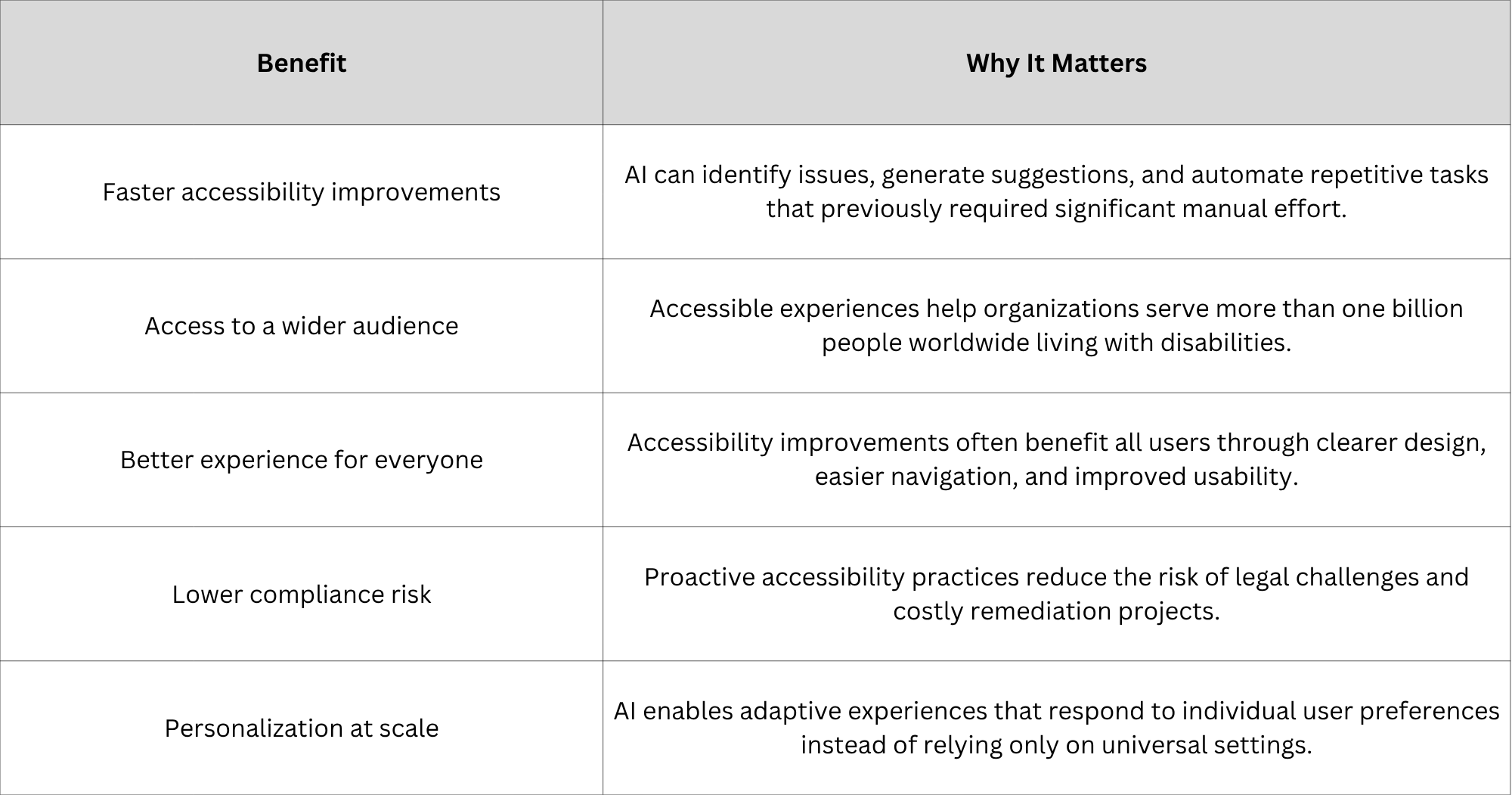
One of the key concepts in the topic of accessibility is the phenomenon known as the curb cut effect.
The curb cuts that were initially developed for people in wheelchairs ended up benefiting parents pushing strollers, travelers carrying luggage, cyclists, delivery staff members, and other people as well.
In digital context, it happens similarly.
Features designed to aid people with disabilities usually make the experience of using a platform better for everybody else as well. Captions help when listening to videos in noisy surroundings. Clear navigation makes it easier for visitors to understand websites. Simplified language allows for quick comprehension of information.
With the use of AI, it has become much easier to make those kinds of changes.
How to Use AI for Accessibility the Right Way
AI can greatly enhance the accessibility results that you achieve, but it will require doing things right with AI. It is not about trying to use AI to replace the accessibility process. It is about pairing the abilities of AI with good design and development practices.
The AI accessibility process works like this:
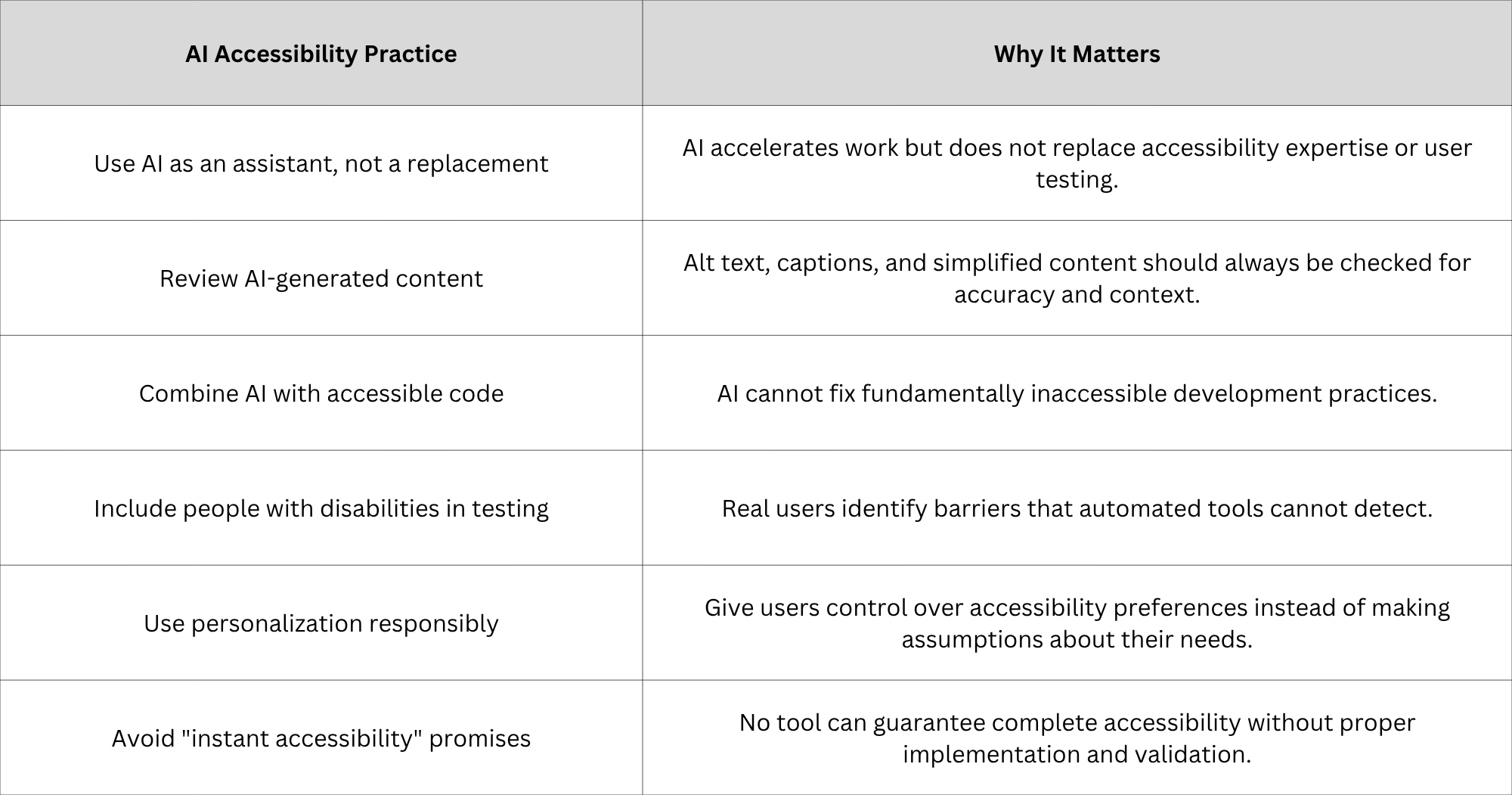
The organizations that succeed with AI accessibility will be those that understand this balance. AI provides speed. Humans provide judgment. Together, they create a more reliable path toward inclusive digital experiences.
Conclusion
The connection between AI and accessibility is moving into its next major stage.
For decades now, inclusive design was about making sure digital products conformed to certain existing standards. This practice is still crucial. Accessible code, semantic markup, keyboard access, and compatibility with assistive technologies will remain the key pillars of accessibility.
However, there is a new opportunity for inclusive designers – creating adaptable experiences.
Rather than developing just one single product or website, companies could create a digital space that responds to individuals' requirements. Users will have more freedom of choice regarding the ways they engage with technologies, while brands will be able to offer highly-personalized experiences to them.
Yet, the future of accessibility should not involve substituting human judgment with automation.
The most optimal strategy would incorporate the following three aspects:
- Accessibility fundamentals created during the design and development process.
- AI tools accelerating testing, creation, and personalization of accessible products.
- Verification by accessibility experts and individuals with disabilities.
This mixture of the three components marks the next era of inclusive design.
AI does not make accessibility easier by eliminating the human factor from it. AI makes it easier by improving human capabilities.
Build More Inclusive Experiences with AI-Powered Personalization
Accessibility cannot be merely an end goal that is ticked off once the product has been developed. Instead, accessibility must be a continuous journey that evolves according to the needs of its users.
Access solutions such as AccessBit, on the other hand, aim to take digital accessibility one step further and consider the next frontier of digital accessibility, which is AI-driven personalized accessibility, in tandem with accessible design.
The future of accessible technology will not involve the dichotomy of choosing either AI or accessibility. It will be about bringing together the best of both worlds, along with human-centric design.
Frequently Asked Questions
1 . Will AI make my website accessible?
There are several ways AI can contribute to making a website accessible, but a website will not become accessible without human assistance. AI-powered programs can be used to produce alt text, detect accessibility problems, create captions, simplify the language, and so on. Still, accessible coding, proper design, testing, and the input of people who have disabilities remain critical elements.
2. Is AI-generated alt text accurate?
AI-generated alt text is helpful when you need to produce numerous descriptions because of the large number of images on your website. But it should be reviewed by humans since the AI tool might overlook the content or the purpose of the image. The most efficient way to use AI technology is to have the AI provide the first description and then check it.
3. Does AI replace accessibility audits?
No. The use of AI does not replace accessibility audits; it makes them easier to perform. The use of AI-based testing tools is good for finding out many of the common technical problems, but it cannot provide complete information about usability and context. Testing performed manually and user testing is still an important part of the process of making something accessible.
4. How is AI used in inclusive design?
There are multiple ways in which AI is used in inclusive design, among which there are image description generation, captioning and transcription, accessibility testing, simplification of the content, improvements in voice interaction, and personalization of the digital experiences. All of these uses contribute to flexibility and inclusivity of the product being created.
5. Can AI personalize accessibility for each user?
Yes. The use of AI allows personalizing the accessibility of each interface, depending on the preferences of its user. Some of the things that people may customize include their vision, cognitive accessibility, screen readers, motor accessibility, ADHD, and motion sensitivity.


